 ultimate-guide
Implementing AI in Talent Acquisition Workflows: 2026 Guide
Table of Contents
- Why AI in Talent Acquisition Workflows Matters Now
- AI Recruiting Best Practices: Getting the Foundations Right
- AI Candidate Screening: Shortlisting Without Filtering Out Good Fits
- AI Interview Scheduling: Ending the Back-and-Forth
- AI Recruiting Workflow Automation: Connecting the Steps
- How to Measure Whether AI Is Improving Your Talent Acquisition Workflows
- Common Mistakes and What to Ignore
- Frequently Asked Questions
Last Updated: October 16, 2026
Why AI in Talent Acquisition Workflows Matters Now
Implementing AI in talent acquisition workflows is no longer a future consideration; it is the practical answer to a problem most hiring teams already feel every week. Talent acquisition workflows are the connected steps a business follows to turn an applicant into a signed offer: responding to the application, asking screening questions, booking the interview, sending reminders, following up, and tracking each candidate's progress.
When any one of those steps stalls, the whole hiring process slows down. A field sales candidate applies on a Friday and hears nothing until Wednesday. A dental office manager means to call back three applicants but gets pulled into a patient emergency. A cleaning company owner loses a promising crew lead to a competitor who simply replied faster.
At Pilot AI, we build recruiting tools around one principle: an applicant responds, AI helps handle the conversation and scheduling, your team tracks progress, and humans make the hiring decisions. Below, we break down how to set that up step by step, from foundations to measurement, without overcomplicating it.
AI Recruiting Best Practices: Getting the Foundations Right
The most common mistake with AI recruiting best practices is starting with the tool instead of the process. Before any automation, write down your current hiring steps in order and mark where candidates go quiet or where your team falls behind.
A simple foundation looks like this:
- One place where every applicant lands, regardless of source
- A defined first response, so no one waits days for an acknowledgement
- Clear screening questions asked the same way of every candidate
- A shared calendar view so scheduling does not live in one person's inbox
- A single tracker showing where each applicant stands
Small businesses benefit here as much as larger teams. You do not need dozens of applicants a month for this to pay off; you need consistency. A cleaning company hiring two people a quarter still loses good candidates when replies are slow or interviews get double-booked.
Once the steps are written down, automation has something to attach to. Without that, you are automating confusion.
AI Candidate Screening: Shortlisting Without Filtering Out Good Fits
AI candidate screening works best as a shortlisting aid, not a rejection machine. The goal is to surface the applicants who match your must-haves and flag the ones who need a closer look, while keeping a human in charge of every final call.
Screening questions do most of the work. Ask the same core questions of every applicant, keep them tied to the role, and review the answers against criteria you set in advance. This matters for fairness: when the same questions are asked the same way, you have a defensible, consistent record of why someone moved forward.
A practical setup for a home services company:
- Required: relevant license or certification, if the role needs one
- Required: availability that matches your actual schedule
- Preferred: years of experience in a comparable role
- Preferred: comfort with the tools the job uses daily
Keep a human reviewing flagged candidates rather than auto-rejecting them. Screening should narrow the pile, not close the door.
AI Interview Scheduling: Ending the Back-and-Forth
AI interview scheduling removes the slowest part of most hiring processes: the email chain. Instead of trading messages to find a time, the system offers available slots, the candidate picks one, and the confirmation and reminder go out automatically.
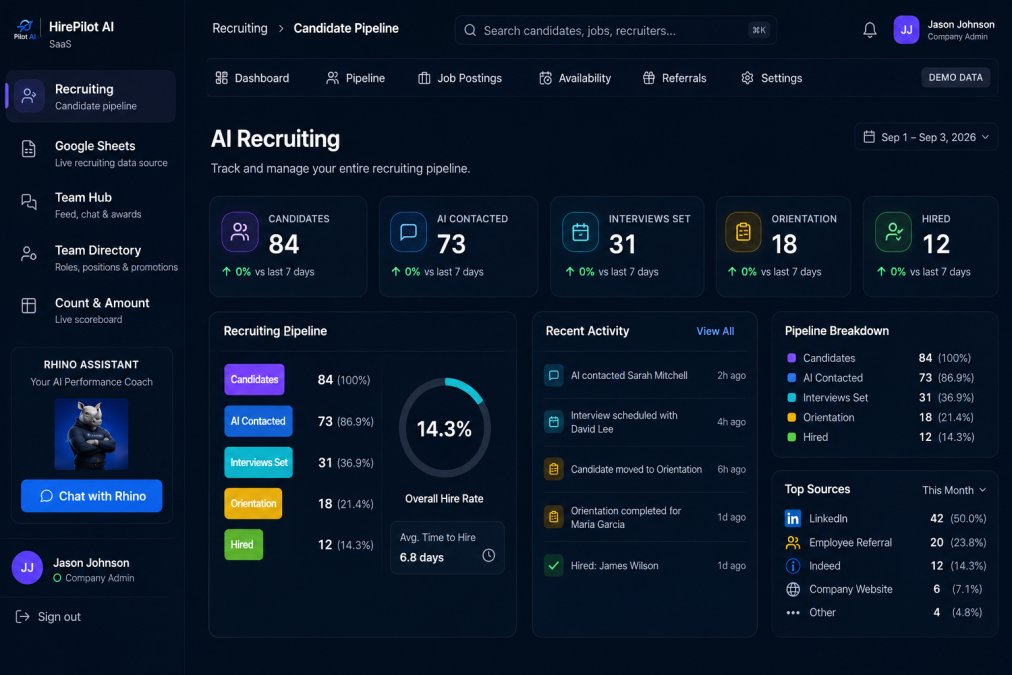
This is where most time-to-hire delays actually live. It is rarely the interview itself; it is the days spent coordinating it. A dental office trying to book three interviews around patient hours, or a sales team juggling candidates across time zones, feels this immediately.
What good scheduling automation handles:
- Offering only slots that fit the interviewer's real availability
- Sending confirmation and reminder messages so candidates show up
- Letting candidates reschedule without a phone call
- Logging every booking in one place your team can see
If you are evaluating tools, ask two questions: can it handle your specific interview stages, and does it keep a human able to override any booking? Multi-stage processes, like a phone screen followed by a working interview, should map cleanly rather than being forced into a generic template.
AI Recruiting Workflow Automation: Connecting the Steps
AI recruiting workflow automation is what turns separate tools into one flow. The value is not in any single step; it is in connecting application, screening, scheduling, reminders, and follow-up so nothing falls through the gap between them.
Here is how the pieces fit together:
| Stage | What AI Handles | What Your Team Does |
|---|---|---|
| Application received | Instant acknowledgement, screening questions sent | Reviews flagged answers |
| Screening | Collects and organizes responses | Decides who moves forward |
| Scheduling | Offers slots, books, confirms | Conducts the interview |
| Reminders | Sends timed nudges to candidates | Steps in if someone goes quiet |
| Follow-up | Keeps candidates updated on status | Makes the hiring decision |
The throughline here is simple: AI runs the coordination, humans run the judgment. A field sales team does not need AI to decide who can sell; it needs AI to make sure the strong candidate who applied Tuesday is not still waiting for a reply on Friday.
This is where Pilot AI's recruiting tools fit. We connect applicant response, screening, scheduling, and progress tracking so your team sees every candidate in one place, and we keep the final decision firmly with your people. If you want a clear read on where your own process is leaking time, you can Get a Free Recruiting Audit to review your applicant response, follow-up, and scheduling.
How to Measure Whether AI Is Improving Your Talent Acquisition Workflows
Measure four things and you will know whether your talent acquisition workflows are actually improving. Skip the vanity metrics and track the points where candidates drop out.
- Response time: how long between application and first reply
- Scheduling time: how long from "we want to interview" to a booked slot
- Show rate: how many scheduled interviews actually happen
- Stage drop-off: where candidates disappear from the process
Track these before and after you add automation. If response time falls and show rate rises, the change is working. If candidates still stall at the same stage, the problem is not the tool; it is that step of the process.
For context on how much hiring speed matters to candidates, the Society for Human Resource Management publishes ongoing research on recruiting and candidate experience, and the U.S. Equal Employment Opportunity Commission sets out the anti-discrimination rules that apply to hiring in the United States. Consistency in screening and documentation is not just efficient; it is how you stay on the right side of those rules.
Common Mistakes and What to Ignore
The most common mistakes with AI in hiring are predictable, and avoiding them is mostly about restraint.
- Automating a broken process. Fix the steps first, then automate them. Automating chaos just produces faster chaos.
- Letting AI reject candidates outright. Screening should shortlist and flag, never close the door on its own.
- Ignoring the candidate experience. A slow, robotic process drives good people away, whatever the tool promises.
- Chasing every shiny feature. You do not need a sprawling system. You need reliable replies, scheduling, and tracking.
- Forgetting the human handoff. The moment a candidate needs a real conversation, a person should be ready.
What to ignore: hype about fully autonomous hiring. The teams that get the most from automation treat it as coordination support, not a replacement for judgment. The U.S. Department of Labor publishes guidance on hiring and workplace practices that is worth checking as your process evolves.
Frequently Asked Questions
How can AI be implemented in talent acquisition workflows?
Start with one high-volume step, usually applicant response or interview scheduling. An applicant replies to your posting, the AI asks screening questions and offers available time slots, then the team tracks each candidate's status in one place. Humans still review and decide. Pilot AI supports this flow with recruiting tools built to handle conversations, scheduling, and progress tracking, so you can expand to screening and follow-up once the first step runs smoothly.
Which recruiting tasks can AI help automate?
The tasks that eat the most admin time: replying to applicants, asking screening questions, booking interviews, sending reminders, and following up with candidates who go quiet. AI recruiting workflow automation handles these repetitive steps so your team focuses on conversations and decisions. In practice, a home services company might let AI schedule all first-round calls, while a dental office uses it to confirm interviews and reduce no-shows.
How can AI help with applicant screening and interview scheduling?
With AI candidate screening, the system asks consistent questions and flags responses against the criteria you set, so every applicant gets the same first pass. For AI interview scheduling, it checks your team's availability and offers slots directly to candidates. The result is faster shortlists and fewer emails. Your hiring managers still review flagged candidates and make the final call, which keeps judgment where it belongs.
How do hiring teams use AI while keeping humans in control of hiring decisions?
Set the AI to handle logistics and information gathering, not judgment. It can ask screening questions, schedule interviews, and send reminders, but a person reviews every shortlist and conducts every interview. Define clear criteria before you turn anything on, and check flagged candidates regularly to confirm the AI is surfacing the right people. This division keeps speed high without handing decisions to software.
What are the risks of using AI in recruitment, and how can teams reduce them?
The main risks are inconsistent screening criteria and over-reliance on automated flags. Reduce them by writing your screening questions and criteria first, reviewing a sample of AI decisions weekly, and keeping a human review step before any rejection. Also check that your process follows applicable employment rules in your area. Treat AI as a first-pass assistant, not a decision-maker, and document how each candidate moved through the workflow.
How should a business measure whether AI is improving its recruiting workflow?
Track four numbers before and after implementation: time to first response, time to schedule an interview, interview no-show rate, and time from application to hiring decision. Compare the same roles over the same period. If response time drops but no-shows rise, adjust your reminder flow. If scheduling speeds up but shortlist quality falls, revisit your screening questions. Small businesses can track these in a simple spreadsheet.
Can small businesses use AI for recruiting with a low volume of applicants?
Yes. You do not need high applicant volume to benefit. A cleaning company hiring two people a month still saves time when AI answers every applicant within minutes, asks consistent screening questions, and books interviews without phone tag. The setup is the same whether you get five applications a week or fifty. Start with applicant response and scheduling, then add screening once those steps feel routine.
Hiring does not have to mean losing good candidates to slow replies and tangled calendars. If your team is buried in scheduling and follow-up, Pilot AI brings recruiting, automated training, and performance tracking into one place, so applicant response, screening, and interview scheduling run smoothly while your people make the calls that matter. Get a Free Recruiting Audit and see exactly where your process is losing time.