 blog
Workable Alternative for Professional Services: 2026 Guide
Last Updated: November 19, 2026
Quick Summary
Pilot AI is a workable alternative for professional services firms that need configurable multi-stage interviews, referee tracking, and client confidentiality controls. It combines AI-assisted applicant response, screening questions, scheduling, and follow-up with human sign-off, plus automated training and performance tracking. Pricing depends on team size and scope, so contact Pilot AI for a current quote.
- General ATS platforms handle job board distribution well but turn referee records and scorecards into configuration projects.
- Ask vendors to demo one real senior-consultant hire end to end, including the referee check and partner sign-off.
- Export candidate and job data including rejected and archived candidates, notes, stage history, and attachments before migrating.
- Set role-based permissions before inviting users so practice leads see only candidates for their engagements.
- Run a pilot with one open role and keep the old system read-only for a defined period after cutover.
Table of Contents
- Why Professional Services Firms Outgrow Workable
- Recruiting Software for Professional Services: What Actually Matters
- Applicant Tracking System Comparison: Features, Pros, and Cons
- AI Recruiting Software: Where It Speeds Up Hiring
- Best HR Software for Small Businesses and Growing Teams
- Migrating from Workable: Implementation and Data Transfer
- Get a Free Recruiting Audit Before You Switch
- Frequently Asked Questions
Why Professional Services Firms Outgrow Workable
The first sign is usually a spreadsheet. A hiring manager starts tracking referee checks outside the system because the workflow doesn't fit inside it.
That mismatch is the whole story. Workable handles job posting, candidate management, and basic pipeline stages well enough.
Below, we break down what to look for, how the main options compare, and how to migrate without losing your candidate history.
Recruiting Software for Professional Services: What Actually Matters
Recruiting software for professional services needs three things a generic ATS often treats as afterthoughts: configurable multi-stage interview workflows, referee and reference tracking, and role-based access so client-facing staff see only what they should.
The evaluation criteria that matter most, in order:
- Workflow flexibility. Can you model a five-stage process with different interviewers per stage without rebuilding it every time?
- Referee and reference tracking. Are reference contacts stored as structured records, or as free-text notes someone will lose?
- Candidate experience. Do applicants get timely updates, or silence for three weeks?
Multi-Stage Interviews and Referee Checks
Most ATS platforms support multiple interview stages. Far fewer support them cleanly when each stage has different participants, different scorecards, and a referee check running in parallel.
A practical test: ask whether you can assign a distinct interview kit to each stage, whether scorecards are tied to competencies, and whether referee contact details sit in a trackable field with a status.
Applicant Tracking System Comparison: Features, Pros, and Cons
An applicant tracking system comparison for professional services should weigh workflow depth against ease of use, not feature count.
| Platform type | Best for | Standout strength | Watch out for |
|---|---|---|---|
| AI recruiting suites (Pilot AI) | Firms wanting recruiting, training, and performance in one place | AI-assisted applicant response, screening questions, scheduling, and follow-up with human sign-off | Newer category, so ask for a workflow walkthrough before committing |
| General ATS platforms | High-volume, single-track hiring | Fast setup and broad job board distribution | Multi-stage and referee workflows need configuration; specialist evaluation is often free-text |
| Enterprise HR suites | Large firms with dedicated HRIS teams | Deep HR management and payroll integration | Long implementation and heavier admin for small recruiting teams |
| All-in-one HR for SMBs | Small teams wanting one login | Simple onboarding and basic ATS | Limited customization for specialist roles and client-facing confidentiality |
Pilot AI sits in the first row and is our recommendation for firms that want recruiting efficiency without stitching separate tools together. Its recruiting capabilities cover applicant response, screening questions, interview scheduling, and reminders, and the platform also includes automated training and performance tracking.
What General ATS Platforms Do Well, and Where They Stall
General ATS platforms are genuinely good at the top of the funnel. They distribute job postings to multiple boards, parse resumes, and give recruiters a clean pipeline view.
The stall happens at the specialist end. A consulting firm hiring a senior associate needs four interview rounds with different partners, a case interview scored against competencies, two referee calls logged with status, and a confidentiality step before the candidate sees client names.
Where Enterprise HR Suites Fit, and Where They Don't
Enterprise HR suites win on payroll, benefits, and HRIS depth. If your firm already runs one for 300 employees, adding recruiting there keeps data in one place. The trade-off is implementation time and admin overhead: recruiting workflows often need a dedicated HRIS administrator, and hiring managers may find the interface heavy for a single scorecard. For a 15-person architecture practice, that overhead rarely pays back.
The Professional-Services Evaluation Criteria Competitors Skip
Most comparison articles stop at features and price. For professional services, add these four criteria to your shortlist scorecard:
- Project-based staffing support. Can the system tag candidates by available start date, engagement type, and utilization target, so you can match a hire to a client project rather than a generic requisition?
- Specialist evaluation. Does it support skills matrices, certifications, portfolios, or case-interview scorecards, or does everything collapse into a free-text notes field?
- Client confidentiality controls. Can you restrict candidate records so client-facing staff see only the candidates for their engagements, and can you redact client names from interview materials?
A practical test: ask each vendor to walk through one real senior-consultant hire end to end, including the referee check and the partner sign-off. If the demo requires a workaround, you will be maintaining that workaround for years.
How to Read a Pricing Breakdown Without Overpaying
Subscription cost in this category is usually quoted per seat, per job, or per monthly active user, and the headline number rarely tells the full story. Ask three questions before signing:
- Which users count as seats: recruiters only, or every hiring manager who leaves a scorecard?
- Are job postings, job distribution, and career site hosting included or metered?
- What does data migration from Workable cost, and is implementation billed separately?
Total cost of ownership matters more than the sticker. A cheaper plan that charges for every interviewer often costs more than a higher plan with unlimited reviewer access.
AI Recruiting Software: Where It Speeds Up Hiring
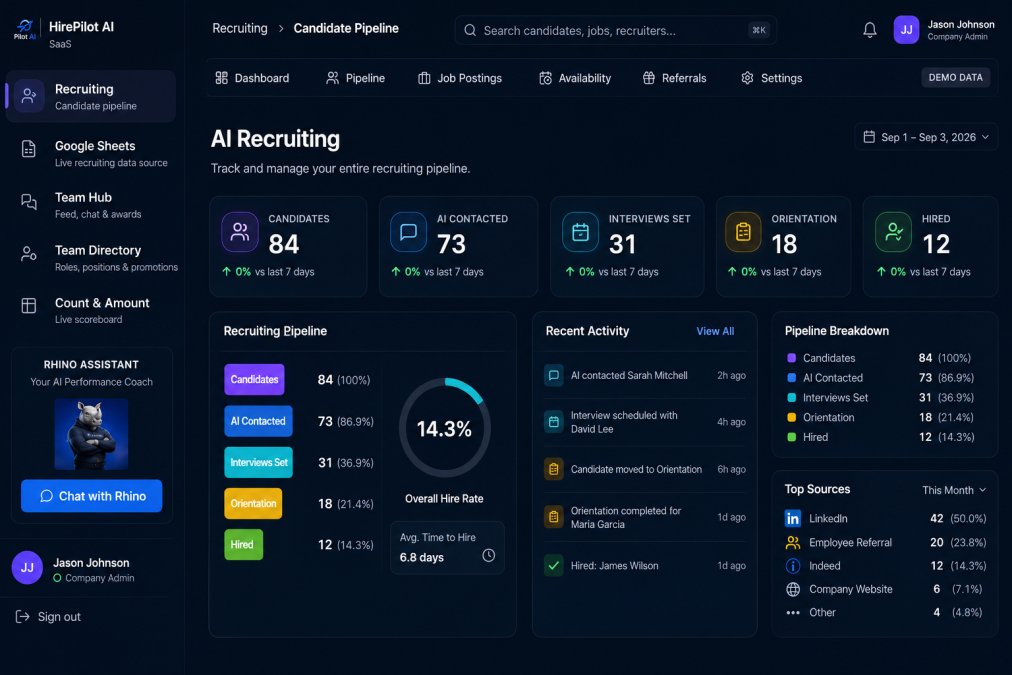
AI recruiting software speeds up hiring in three places: first response to applicants, scheduling, and follow-up. Everything else is secondary.
The honest version is that most time-to-hire delays are not decision delays. They are response delays. A candidate applies, waits four days for an acknowledgment, and takes another offer.
For a deeper look at where this fits, our guide to implementing AI in talent acquisition workflows covers the practical steps.
Keeping Humans in the Hiring Decision
AI should never make the hiring decision. It should clear the admin around it. Screening questions filter on stated criteria, scheduling runs automatically, and reminders chase the people who go quiet, but a person reviews the shortlist and runs the interview.
Bias is the real risk here, and it deserves attention rather than a checkbox. Our article on how to spot and reduce AI bias in recruitment software walks through the practical checks, including auditing screening criteria and keeping a human review step on every rejection.
Best HR Software for Small Businesses and Growing Teams
The best HR software for small businesses is the one that survives your next twenty hires without a rebuild.
For growing teams, the failure mode is tool sprawl: an ATS here, a training platform there, a spreadsheet for reviews. Every new system means another login and another integration to maintain.
For a same-topic deep dive, our guide to scaling HR systems for growth stage covers the decision in more detail.
Migrating from Workable: Implementation and Data Transfer
Migration from Workable is manageable if you sequence it properly. The mistake is trying to move everything at once. A practical migration checklist covers candidate data, job templates, permissions, integrations, and change management.
A workable migration sequence:
- Export candidate and job data from your current system, including notes, stage history, attachments, and any custom fields. Confirm the export includes rejected and archived candidates, not just active pipelines.
- Map stages and fields to the new system before importing anything. Write the mapping down: old stage name, new stage name, who owns it, and which scorecard attaches to it.
- Rebuild job templates for your common roles, senior consultant, field technician, dental hygienist, account manager, so hiring managers start from a known workflow.
- Set permissions before you invite users. Decide which roles see candidate contact details, which see client names, and which can move a candidate between stages.
- Run a pilot with one open role to test the workflow end to end, including the referee check and the partner sign-off.
- Train hiring managers on scorecards and scheduling, not on every feature. A 30-minute session on how to leave a structured scorecard beats a two-hour feature tour.
- Switch over once the pilot role closes cleanly, and keep the old system read-only for a defined period so you can answer questions about past candidates.
Data migration usually covers candidates, jobs, notes, and attachments; confirm the scope in writing, including whether interview scorecards and referee records transfer or need to be recreated. Our guide on how to train managers on new HR software is a useful companion here.
Candidate Data: What to Move, What to Leave
Not every record needs to travel. Move active candidates, recent hires, and anyone in a referee or offer stage. For older rejected candidates, check your retention policy first, professional-services firms often hold candidate data longer than necessary, and a migration is a natural moment to clean up.
Watch out: importing free-text notes without a field mapping turns searchable data into a pile of unstructured text, and you will lose the ability to filter by certification, availability, or referee status.
Permissions and Client Confidentiality
Professional-services firms handle candidate data that often references client engagements. Before go-live, decide who can see what: recruiters, practice leads, partners, and client-facing staff may need different views. Set up role-based access so a practice lead sees only candidates for their engagements, and redact client names from interview materials where confidentiality matters. Document the access model in one page so it survives staff turnover.
Integrations and Change Management
List the integrations you actually use, calendar, email, job boards, HRIS, payroll, and confirm each one works before you switch off the old system.
Change management is the part most migration guides skip. Name an owner for the migration, set a cutover date, and tell hiring managers what changes for them in one short message.
If you want an independent read on where your hiring stalls before you switch, you can explore Pilot AI and request a free recruiting audit covering applicant response, follow-up, scheduling, and potential bottlenecks.
Get a Free Recruiting Audit Before You Switch
A free recruiting audit reviews applicant response times, follow-up cadence, scheduling friction, and the bottlenecks slowing your pipeline. It tells you whether the problem is the tool or the process around it.
The real cost of an ATS that doesn't fit isn't the subscription. It's the senior candidate who waited four days for a reply and took the other offer.
Frequently Asked Questions
What are the best alternatives to Workable for professional services firms?
The best workable alternative for professional services depends on your hiring model. Firms with multi-stage interviews and referee checks need an ATS that supports custom workflows, not just job posting. Look for applicant tracking system comparison data on candidate pipeline stages, interview scheduling, and reporting and analytics. Pilot AI offers AI recruiting software alongside performance tracking tools. Compare pros and cons against your current process before switching.
How should a professional services firm compare recruiting software?
Start with your actual hiring workflow: how many interview stages, who reviews candidates, and how referee checks are recorded. Then compare recruiting software for professional services on four points: ease of use, self-service setup, software integrations, and reporting and analytics for time to hire. Ask each vendor how their hiring platform handles candidate screening and interview scheduling. A fair applicant tracking system comparison should include pricing plans, subscription cost, and data migration support, not just feature lists.
Can AI recruiting software help a small professional services team manage applicants?
Yes, for the repetitive parts. AI recruiting software can help handle applicant responses, reminders, and interview scheduling, so a small team does not lose candidates to slow follow-up. The team still reviews resumes and makes hiring decisions. Pilot AI is built for this pattern: an applicant responds, AI helps manage the conversation and scheduling, and your team tracks progress in the candidate pipeline. Small businesses with modest applicant volume can use it too; you do not need a high-volume hiring funnel to use it.
What is the difference between recruiting software and an HRIS?
Recruiting software, or an applicant tracking system, manages the hiring workflow: job posting, job distribution, candidate sourcing, candidate screening, interview scheduling, and offers. An HRIS or human resources platform covers employee records, payroll, and HR management after the hire. Some suites combine both. If your main pain is time to fill and candidate experience, prioritize recruiting features first. If you also need employee onboarding and performance tracking, look for a hiring platform that connects recruiting to those workflows.