 Comparison
What Is the Best HR Tech Stack for Remote Scaling Teams?
Last Updated: October 25, 2026
Quick Summary
The best hr tech stack for remote scaling teams is a connected set of tools that share one employee record, automate the applicant conversation from first reply to scheduled interview, and support hiring and onboarding across time zones without adding admin headcount. Start with a core HR record, then connect the tools that write to it.
- HR software for remote teams splits into four layers: system of record, hiring, payroll and benefits, and performance and engagement.
- An HRIS stores employee data, while an HR tech stack is the full set of connected systems across the employee lifecycle.
- Stack priorities shift by stage: buy for speed at 50 employees, connection at 120, and governance at 500.
- Duplicate employee records appear when hiring, HRIS, and payroll tools each create separate records nobody links.
- Run a live test with a real job posting and applicant before committing to any HR platform.
Table of Contents
- Why a Remote Scaling Team Needs a Different HR Tech Stack
- HR Software for Remote Teams: Core Components and Use Cases
- HRIS vs HR Tech Stack: What's the Difference and Why It Matters
- Recruiting Automation Tools for Small Businesses That Are Scaling Fast
- Remote Employee Onboarding Software: Distributed Onboarding That Works
- Stack Blueprints by Growth Stage: 50, 120, and 500 Employees
- How to Evaluate HR Platforms Before You Commit
- Get a Free Recruiting Audit Before Your Next Hire
- Frequently Asked Questions
Why a Remote Scaling Team Needs a Different HR Tech Stack
Remote work makes every gap in that chain visible. There is no hallway conversation to rescue a slow follow-up, and no front desk to hand a new hire their first-week checklist. The stack has to carry the process.
Below, we break down what belongs in the stack, how it changes at 50, 120, and 500 employees, and where AI genuinely helps versus where it just adds another login.
HR Software for Remote Teams: Core Components and Use Cases
HR software for remote teams splits into four working layers: a system of record for employee data, a hiring layer for recruiting and applicant tracking, a payroll and benefits layer, and a performance and engagement layer. Each layer has a clear job, and each one needs to exchange data with the others.
- Core HR / HRIS: the single source of truth for names, roles, start dates, managers, and documents
- Recruiting and applicant tracking: job postings, applicant replies, screening questions, interview scheduling, and reminders
- Payroll and benefits: pay runs, tax filings, and benefits enrollment tied to employment status
- Performance and engagement: goals, check-ins, review cycles, and training completion
- Onboarding: pre-start tasks, equipment requests, and first-week scheduling
The mistake often seen is buying the hiring layer first because hiring hurts the most, then bolting on a system of record later. That order creates duplicate records and months of cleanup. Start with the record, then connect the tools that write to it.
Core HR and Employee Data Management
Core HR is the layer that holds employee data: who works for you, in what role, reporting to whom, in which location or country, and on what employment model. Everything else in the stack reads from it.
For distributed teams, the record needs three fields that office-based setups often skip: work location, time zone, and employment type (employee or contractor). Add a manager field that reflects reality rather than the org chart poster, because reminders and approvals route from it.
Talent Acquisition and Recruiting
Recruiting is where remote scaling teams feel the most pain, because every step that used to happen in person now happens in a message thread.
A practical recruiting setup automates the repetitive parts of that conversation while keeping the hiring decision with a human. If you are choosing tools for a scaling remote team, our comparison of AI recruiting software for startups covers the options.
Payroll, Benefits, and Compliance
Payroll is the least forgiving layer. A late pay run damages trust faster than any other admin error. Benefits administration and employment compliance sit beside it, and both depend on the core HR record being current.
We will not quote filing deadlines or statutory amounts here, because those vary by country, state, and employment model and change regularly. Check the official tax and labor authority for your jurisdiction before you configure anything.
HRIS vs HR Tech Stack: What's the Difference and Why It Matters
An HRIS is one system that stores and manages employee data (Understanding HR Technology and the Value for Business Transformation). An HR tech stack is the full set of connected systems a company uses across the employee lifecycle, of which the HRIS is the foundation.
Here is how the two compare in practice:
| Layer | HRIS | HR Tech Stack |
|---|---|---|
| Scope | Employee records and core admin | Records plus hiring, onboarding, payroll, performance |
| Typical owner | HR or operations | Shared across HR, finance, and hiring managers |
| Main risk | Stale data | Duplicate records and manual re-entry between tools |
| Success measure | Record accuracy | Data flows between systems without human handoffs |
A single HRIS with clean data beats five disconnected tools. A connected stack beats a single tool that does everything badly. The question to ask is whether each new tool writes back to the record or creates a second copy of it.
Recruiting Automation Tools for Small Businesses That Are Scaling Fast
Recruiting automation tools for small businesses handle the parts of hiring that scale badly with headcount: first replies, screening questions, interview scheduling, and reminders. A five-person company can reply to every applicant by hand.
The useful test for any tool in this category is simple. Ask it to show you what happens when an applicant replies at 11pm on a Sunday. If the answer is "nothing until someone logs in," the tool is a database, not automation.
Where AI Fits in Applicant Response and Interview Scheduling
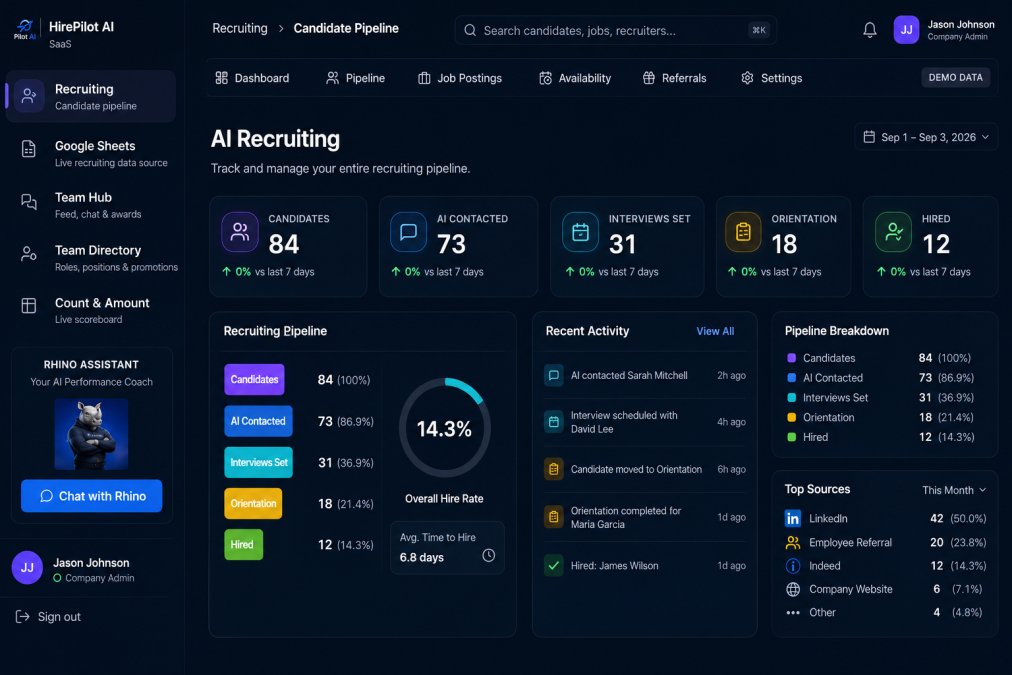
AI fits in applicant response and interview scheduling at the handoff points: it can acknowledge a reply, ask the screening questions your team defined, offer interview slots that match the hiring manager's calendar, send reminders, and flag stalled conversations for a human.
This is the workflow we build around at Pilot AI: an applicant responds, the AI handles the conversation and scheduling, the team tracks progress in one place, and humans decide. For a practical guide to implementing AI in talent acquisition workflows, see our step-by-step article.
Watch out: the most common failure is switching automation on before the screening questions are written down. The AI will ask something, but it may not be the thing your hiring managers actually care about.
Remote Employee Onboarding Software: Distributed Onboarding That Works
Remote employee onboarding software coordinates the pre-start and first-week tasks that used to happen in an office: paperwork, equipment, account access, introductions, and training. Our guide to the best ways to automate employee onboarding walks through concrete options.
Three things separate onboarding that works from onboarding that frustrates:
- Time-zone fairness: schedule live sessions in the new hire's working hours, not headquarters hours
- Asynchronous defaults: record the walkthroughs and write the checklists, so nobody waits for a meeting
- One checklist, one owner: a single list that the manager and the new hire both see
Stack Blueprints by Growth Stage: 50, 120, and 500 Employees
Stack blueprints change with headcount because the coordination cost changes. At 50 employees, one operations person can hold the process together with good tools. At 500, the process has to hold itself together without that person in the room.
| Stage | Priority in the stack | What to add next | What breaks first |
|---|---|---|---|
| 50 employees | Core HR record plus a hiring layer with automated replies | Onboarding checklist and scheduling automation | Manual follow-up when hiring volume spikes |
| 120 employees | Payroll reading from core HR, performance check-ins | Screening automation and manager dashboards | Duplicate records across hiring and HR tools |
| 500 employees | Integration architecture and data ownership | People analytics and access controls | Reporting nobody trusts because the data disagrees |
At 50, buy for speed. At 120, buy for connection. At 500, buy for governance: who owns the employee record, who can edit it, and how access is controlled. For a deeper guide to scaling HR systems across growth stages, see our full breakdown.
Integration Architecture and Avoiding Duplicate Employee Records
Duplicate employee records are the quiet tax on a scaling stack. They appear when the hiring tool creates a candidate record, the HRIS creates an employee record, and payroll creates a third, and nobody links them.
The fix is architectural, not a cleanup project. Decide which system owns the employee record, make every other tool read from it, and use a unique identifier that survives the candidate-to-employee transition. Before you add any tool, ask two questions: does it write back to the record, and who is allowed to edit it?
How to Evaluate HR Platforms Before You Commit
Evaluate HR platforms against your own workflow, not a feature list. Every vendor will show you a demo that works. The question is what happens on a Tuesday when a candidate ghosts, a manager goes on leave, and a pay run is due.
Use this checklist before you sign anything:
- Does the tool read from and write to your core employee record?
- Can it handle your actual screening questions and interview stages?
- What happens to an applicant reply that arrives outside working hours?
- Who can see and edit employee data, and how is access controlled?
- What does migration from your current tools involve, and how long does it take?
- What is the exit path if it does not work for your team?
- Can you see a reference from a company your size in your industry?
Two evaluation habits save real time. First, run a live test with a real job posting and a real applicant before you commit. Second, ask each vendor to show you the reporting view a hiring manager would actually use, not the admin view.
Get a Free Recruiting Audit Before Your Next Hire
Most stacks do not fail all at once. They fail at the handoffs: the reply that waits overnight, the interview that never gets scheduled, the new hire whose equipment request goes to an old address. Those gaps can cost candidates long before they cost money.
If you are not sure where your gaps are, start with a review rather than a purchase. Get a Free Recruiting Audit from Pilot AI: we look at your applicant response times, follow-up, scheduling, and the bottlenecks between them, and show you where the process stalls.
Frequently Asked Questions
What should be included in an HR tech stack for a remote team?
A practical HR tech stack for a remote team covers four layers: core HR and employee data (an HRIS), talent acquisition and recruiting, onboarding and employee experience, and payroll and benefits. Add performance management and people analytics once headcount passes roughly 100. The goal is a small set of platforms that share data through integrations, so you avoid duplicate employee records and manual re-entry between systems.
How is an HRIS different from an HR tech stack?
An HRIS is one system of record for employee data such as profiles, job history, and org structure. An HR tech stack is the full set of tools around it, including recruiting, onboarding, payroll, benefits, and performance management. The HRIS is the foundation; the stack is everything connected to it. Confusing the two leads teams to buy overlapping platforms that store the same employee data in several places.
Which recruiting automation tools help small businesses respond to applicants faster?
Look for tools that send automated acknowledgments when an application arrives, handle screening questions, and schedule interviews without back-and-forth emails. Pilot AI supports applicant response and interview scheduling, and the team tracks progress while humans make hiring decisions. Before buying, map your current response times and where candidates drop off, then test whether the tool closes those specific gaps.
How do you evaluate whether HR software will scale with your team?
Test three things: whether the platform supports multiple countries and contractor models, whether its integrations cover your payroll and recruiting tools, and whether permissions can be segmented by team and location. Ask vendors how data ownership and export work, and request implementation timelines in writing. A platform that fits 50 employees but requires a migration at 200 is not a scaling decision; it is a delay.
Scaling a remote team does not require a bigger admin department. It requires a stack where the applicant conversation, the interview schedule, and the employee record flow into each other without a human carrying them by hand. Get started with Pilot AI and give your hiring managers back the hours they spend chasing replies and booking interviews.